Authorization
📋 Summary
Forge uses two identity providers to secure API access:
- Corporate (Entra ID) — internal employees and service accounts
- External (Okta) — policyholders, injured workers, employers, and providers
Both providers are always active. When you expose permissions on your API or call a downstream API, you must configure both.
🏷️ Key Terminology
| Concept | What It Is | Example |
|---|---|---|
| Scope | A permission requested by a calling application — on behalf of a user, or as itself | Client.Read |
| App Role | A permission granted to a user (via Business Roles) or to an application | App.Read |
| Business Role | An organizational position that maps to one or more App Roles | Claims Adjuster, HR Manager |
🏷️ Permission Naming Conventions
Two prefixes, two mechanisms. The prefix tells you exactly what a permission is and where it goes — the same in both providers:
Entra ID: Scopes and App Roles cannot share the same value
In Entra ID, a scope value and an app_role value on the same app registration must never be identical. With this convention Client.* names only ever appear under scopes: and App.* names only ever under app_roles:, so collisions cannot happen.
| Prefix | Mechanism | Entra config section | Okta config file | Token claim |
|---|---|---|---|---|
Client.* |
Scope — requested by calling applications | infra/api/config.yml → scopes: |
infra/auth/ext/okta-client/scopes.yml |
scp |
App.* |
Role — granted to users or applications | infra/api/config.yml → app_roles: |
infra/auth/ext/okta-client/user_groups.yml |
roles (Entra) / user-groups (Okta) |
Platform-managed delegation scopes
user_impersonation (Entra) and user-groups (Okta) are requested automatically by the platform for user-delegated calls — never add them to options.Scopes or define them as custom scopes. Downstream APIs must still grant them to calling apps in their authorized_apps configuration. Experience APIs additionally expose a platform-managed access scope for the OIDC login flow — leave it alone too.
Service-to-service calls
Okta callers request your Client.* scopes directly. Entra callers always request .default and receive the App.* roles you granted them in authorized_apps (in the token's roles claim). For service-to-service access, define a Client.* scope and a matching App.* role, and accept either in @useAuth — see App Permissions.
When writing raw APIM or JWT claim checks
If you write raw policy or claim validation, check the Token claim column above — Client.* is always in scp, while App.* is in roles (Entra) or user-groups (Okta). If you use the platform's TypeSpec @useAuth decorator and generated APIM policies, the platform handles claim-location differences for you.
App.* is granted, never requested
App.* roles are assigned to users (via Business Roles) or to applications (Entra authorized_apps). Never put App.* names in options.Scopes when configuring a Kiota client — options.Scopes only ever contains Client.* names.
Examples:
Client.Read,Client.Write— what a calling application may do (on behalf of a user, or as itself)App.Read,App.Admin— what a user with a certain Business Role, or a service granted the role in Entra, may do
See App Permissions for configuration examples.
🏛️ Dual-Identity Architecture
| Aspect | Corporate (Entra ID) | External (Okta) |
|---|---|---|
| Users | Internal employees | Policyholders, injured workers, employers, providers |
Client.* scopes defined in |
infra/api/config.yml → scopes: |
infra/auth/ext/okta-client/scopes.yml |
App.* roles defined in |
infra/api/config.yml → app_roles: |
infra/auth/ext/okta-client/user_groups.yml |
| Business Role mapping | infra/auth/corp/config.yml |
infra/auth/ext/user/business-role-app-role.yml |
| Platform delegation scope | user_impersonation (auto-added) |
user-groups (auto-added) |
🎫 Proof of Identity and Authorization
When accessing a resource, identity and authorization are validated via a JWT that was digitally signed by the authorization server that minted it. This is a JSON payload that contains claims that contain the identity and access authorization.
Sample JWT:
{
  "ver": 1,
  "jti": "AT.Bdk6ykeyEsSGj9sFNvZC7_9LzH7-ypGpK34a2iCZwsQ",
  "iss": "https://saif-oie.oktapreview.com/oauth2/aushpkatj89kOhK6Y1d7",
  "aud": "api://it-api-sys-envsvc",
  "iat": 1729721521,
  "exp": 1729725121,
  "cid": "0oafxgi1h1dCu0ffJ1d7",
  "uid": "00uci6hkxxR6Ms7lk1d7",
  // scp claim determines requested scope access
  "scp": [
    "it-api-sys-envsvc.Client.Read",
    "it-api-sys-envsvc.user-groups"
  ],
  "auth_time": 1729721521,
  // sub claim determines the user (subject)
  "sub": "shasca@saif.com",
  // user-groups claim determines user role access
  "user-groups": ["it-api-sys-envsvc.App.Read", "it-api-sys-envsvc.App.Write"]
}
This example shows an Okta token, where permission values include the project ID prefix. In TypeSpec, use the logical permission names (Client.Read, App.Read); the platform-generated APIM policies handle provider-specific formatting.
🛡️ Where the Authorization Occurs
Authorization is performed by Azure API Management. When an API is deployed, policies are created on either the API, or individual endpoints specifying values in the scp and user-groups claims of the token required for authorization to occur.
API Policy Types
The api_policy_type setting in infra/api/vars.yml controls how APIM authenticates incoming requests:
| Policy Type | Authentication Method | Use Case |
|---|---|---|
standard |
JWT validation (Okta + Entra) | Default — user-delegated and service-to-service flows with OAuth tokens |
filevine |
JWT validation (Filevine IdP) | Filevine webhook integration with dedicated JWT issuer |
subscription_key |
APIM subscription key | Legacy server-to-server access without OAuth — see Subscription Key Authentication |
Subscription Key Auth
The subscription_key policy type is only available for Experience APIs (is_experience_api = true). It bypasses JWT validation entirely — APIM validates the subscription key natively and sets x-forward-tenant-origin: corp for all requests.
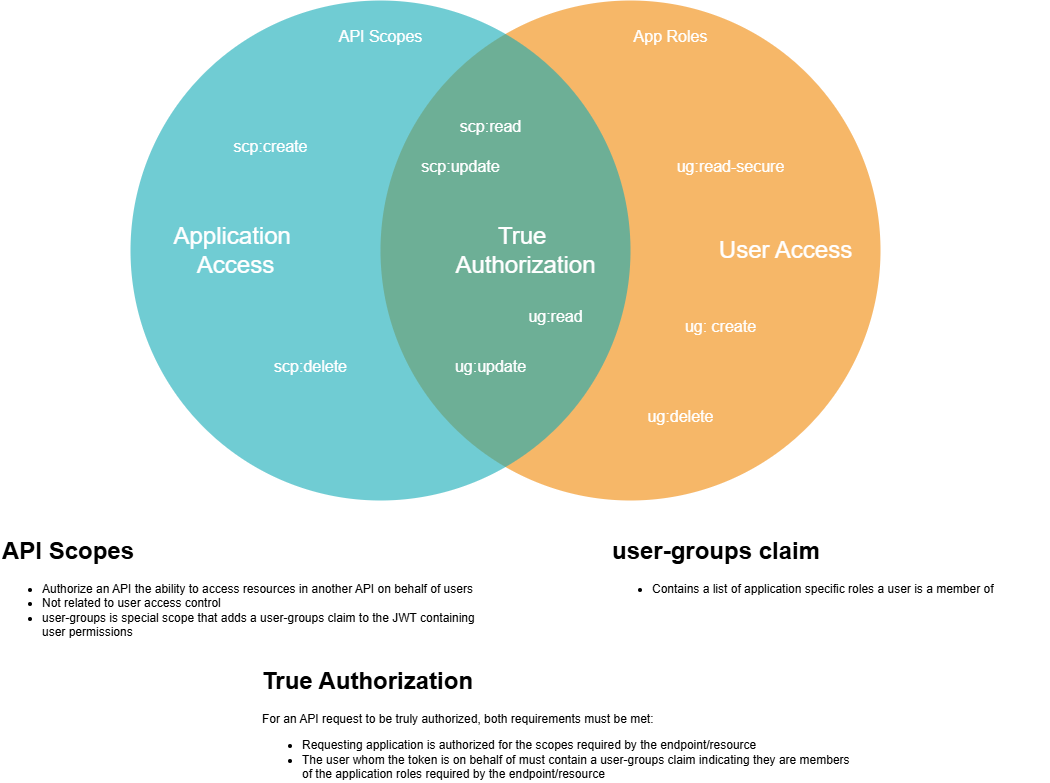
✅ True Authorization
For true authorization, both the requesting app and user the request is on behalf of must be authorized to access the resource. If either does not meet the policy requirements, then access is forbidden by API Management.
📚 Related Documentation
- How Authentication Works - Flow mechanics: token validation, acquisition, and
ScopeBuilderbehavior - Security Configuration Guide - Step-by-step instructions for configuring authentication and authorization
- Subscription Key Authentication - Configure APIM subscription key auth for legacy apps
- Business Roles - How Business Roles work and configuration examples
- User Permissions - Map Business Roles to App Roles
- App Permissions - Configure scopes and authorize upstream apps
- Calling Downstream APIs - Configure Kiota clients with proper scopes
- Environments - Environment configurations and deployment flow